
Every successful website starts with one simple question: what are people actually searching for?
That question has an answer, and finding it doesn’t have to cost you a rupee. Keyword research is the process of discovering the exact words and phrases your audience types into Google. Once you know these words, you can build content that answers real questions, ranks higher, and brings in visitors month after month.
Many beginners assume they need expensive tools like Ahrefs or SEMrush to get started. That’s not true. With the right free tools and a clear process, you can find profitable, low-competition keywords sitting right under your nose.
This guide walks you through the entire process, step by step, using tools that cost nothing. Whether you run a blog, an online store, or a local business in India, you’ll learn exactly how to find keywords your competitors have missed.
What Is Keyword Research and Why Does It Matter

Keyword research means finding the search terms real people use when looking for information, products, or services online. It’s the foundation of every SEO strategy that actually works.
Without keyword research, you’re guessing. You might write an amazing article, but if nobody searches for that exact topic, it won’t get traffic. Keyword research removes the guesswork and replaces it with data.
Here’s why it matters so much:
- It shows you what your audience actually wants, not what you assume they want.
- It helps you prioritize content that has real search demand.
- It reveals gaps your competitors haven’t filled yet.
- It improves your chances of ranking on Google’s first page, where over 90% of clicks happen.
- It saves time by stopping you from writing content nobody searches for.
Google itself confirms that understanding search intent is central to ranking well, which is exactly what keyword research helps you uncover.
Types of Keywords You Should Know
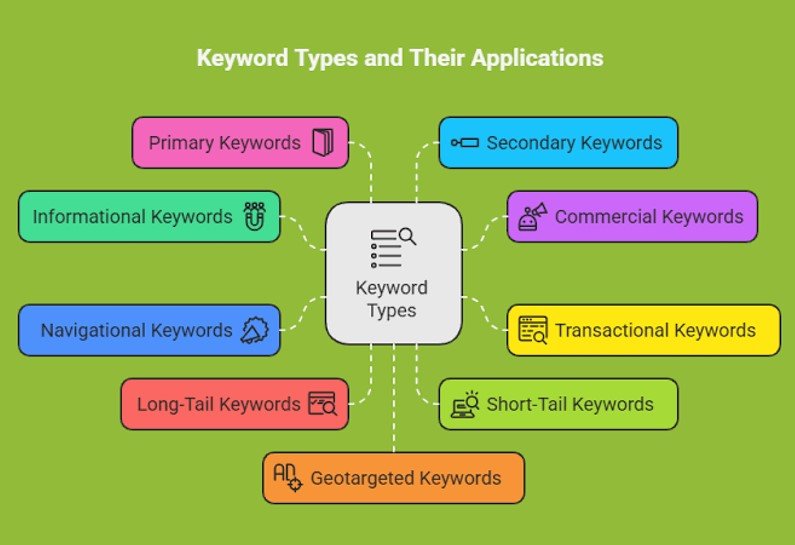
Before jumping into tools, you need to understand the different keyword types. This helps you build a balanced content strategy instead of chasing the same competitive terms as everyone else.
1. Short-Tail Keywords
These are broad, one or two-word phrases like “digital marketing” or “shoes online.” They get huge search volume but are extremely competitive and hard to rank for as a beginner.
2. Long-Tail Keywords
These are longer, more specific phrases like “how to do keyword research for free” or “best budget phone under 15000 in India.” They get less traffic individually, but they’re easier to rank for and often convert better because the searcher’s intent is clearer.
3. Informational Keywords
Used when someone wants to learn something, such as “what is SEO” or “how does compound interest work.” Blog posts and guides target these well.
4. Transactional Keywords
Used when someone is ready to buy or take action, like “buy running shoes online” or “hire SEO consultant in Mumbai.” These keywords have strong commercial intent.
5. Navigational Keywords
Used when someone searches for a specific brand or website, like “Flipkart customer care number.” These are harder to target unless it’s your own brand.
Pro tip: Beginners should focus on long-tail, informational keywords first. They’re less competitive and build authority faster.
Step-by-Step: How to Do Keyword Research for Free

Follow this exact process to find valuable keywords without spending a single rupee.
Step 1: Brainstorm Seed Keywords
Start with broad topics related to your niche. If you run a fitness blog, seed keywords might include “weight loss,” “home workout,” or “protein diet.”
Write down 10–15 seed keywords. These become the foundation for everything else.
Step 2: Use Google Autocomplete
Type your seed keyword into Google’s search bar and don’t press enter. Google will suggest related searches based on real user behavior.
For example, typing “how to do keyword research” might show suggestions like:
- how to do keyword research for free
- how to do keyword research for SEO
- how to do keyword research for YouTube
These autocomplete suggestions are actual phrases people search for, making them a goldmine for content ideas.
Step 3: Explore “People Also Ask” and Related Searches
Scroll down any Google results page and you’ll find two valuable sections:
- People Also Ask – a list of related questions users commonly ask
- Related Searches – found at the bottom of the page, showing similar queries
Both sections reveal exactly what searchers want to know next, helping you build comprehensive, helpful content.
Step 4: Use Google Keyword Planner (Free with a Google Ads Account)

Google Keyword Planner is one of the most reliable free tools for keyword data, even if you’re not running ads.
Here’s how to use it:
- Create a free Google Ads account (no payment required to access the planner).
- Go to Tools and Settings > Keyword Planner.
- Click Discover New Keywords.
- Enter your seed keywords.
- Review search volume, competition level, and related keyword suggestions.
This tool gives you real Google search volume data, which is more accurate than most third-party estimates.
Step 5: Use Free Third-Party Keyword Tools
Several free tools go beyond Google Autocomplete and offer keyword volume, trends, and question-based suggestions. We’ll compare the best ones in the next section.
Step 6: Check Search Intent
Before finalizing a keyword, search it on Google and study the top-ranking pages. Ask yourself:
- Are they blog posts, product pages, or videos?
- Are they answering a question or selling something?
- What format works best for this keyword?
Matching search intent is just as important as finding the right keyword volume.
Step 7: Analyze Competition
Look at the websites ranking on page one. If they’re all large, established brands, the keyword may be too competitive for a new website. If you see smaller blogs or local businesses ranking, that’s a sign the keyword is achievable.
Step 8: Organize Keywords by Priority
Create a simple spreadsheet with columns for:
- Keyword
- Search volume
- Competition level
- Search intent
- Content type needed
This turns your research into an actionable content plan instead of a random list of words.
Best Free Keyword Research Tools Compared

Here’s a comparison of the top free tools available for keyword research in 2026.
| Tool | Best For | Search Volume Data | Keyword Suggestions | Limitations |
| Google Keyword Planner | Accurate volume data | Yes (ranges) | Strong | Requires Google Ads account |
| Google Trends | Trending topics & seasonality | Relative trends | Moderate | No exact volume numbers |
| Google Autocomplete | Real user phrases | No | Strong | Manual process |
| AnswerThePublic (free tier) | Question-based keywords | No | Very strong | Limited daily searches |
| Ubersuggest (free tier) | Beginner-friendly overview | Yes (limited) | Strong | Daily search limit |
| Ahrefs Free Keyword Generator | Quick keyword ideas | Yes (limited) | Strong | Limited results per search |
| Bing Webmaster Tools | Alternate search engine data | Yes | Moderate | Smaller search volume base |
Using two or three of these tools together gives you a more complete and reliable picture than relying on just one.
How to Analyze Keyword Difficulty Without Paid Tools
Paid tools show a “keyword difficulty” score, but you can estimate this manually using free methods.
Check the Top 10 Results
Search your keyword and study the ranking pages. Look for:
- Domain authority signals – Are these well-known, established sites?
- Content depth – Are the articles thorough, or thin and outdated?
- Backlink presence – Use a free tool like Ahrefs’ backlink checker to see how many links top pages have.
Use the “Intitle” Search Operator
Search intitle:”your keyword” on Google. This shows how many pages have optimized their title specifically for that phrase. Fewer results often mean less direct competition.
Study Content Freshness
If most top-ranking articles are several years old and haven’t been updated, there may be an opportunity to outrank them with fresh, more helpful content.
Look for Content Gaps
Read the top 3–5 ranking articles and note what they missed. Maybe they don’t answer a common follow-up question, or they lack examples relevant to Indian readers. Filling these gaps gives your content a competitive edge.
Common Mistakes to Avoid
Even experienced marketers fall into these traps. Avoid them to save time and get better results.
- Ignoring search intent – Ranking for a keyword means nothing if your content doesn’t match what searchers actually want.
- Chasing high-volume keywords only – These are usually the most competitive and hardest to rank for as a new site.
- Keyword stuffing – Repeating a keyword unnaturally hurts readability and can trigger Google’s spam filters.
- Relying on a single tool – Different tools show different data. Cross-checking gives more accurate insights.
- Skipping long-tail keywords – These often bring more targeted, ready-to-convert traffic.
- Not updating research regularly – Search trends shift. Revisit your keyword list every few months.
- Forgetting local intent – For Indian audiences, adding location-based or culturally relevant terms can significantly boost relevance.
Pros and Cons of Free Keyword Research Tools
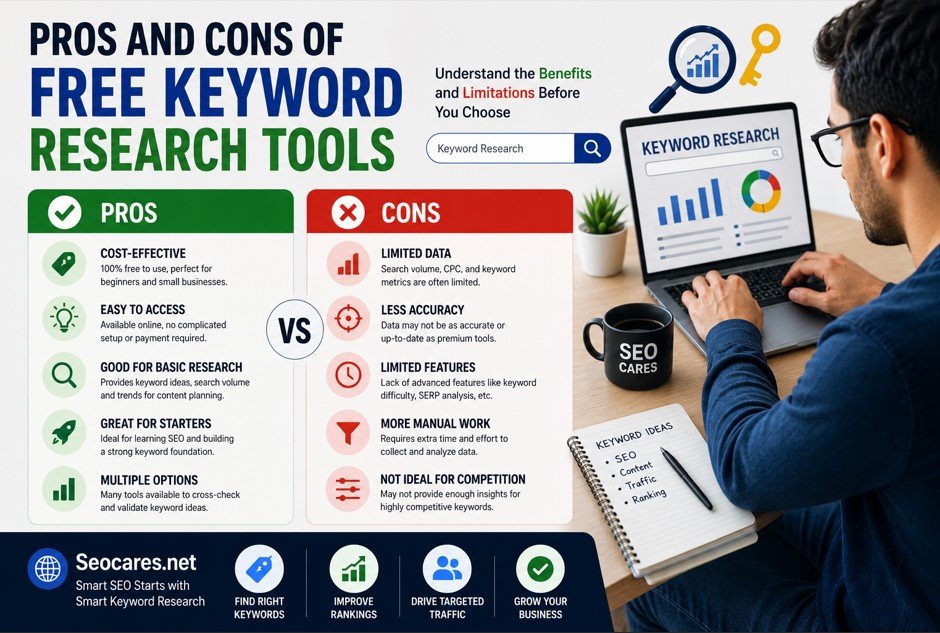 Pros
Pros
- Zero cost, ideal for beginners and small businesses
- Access to real Google data through Keyword Planner
- Great for discovering long-tail and question-based keywords
- No technical skills required to get started
- Multiple tools can be combined for cross-verification
Cons
- Search volume data is often shown as a range, not an exact number
- Daily search limits on tools like Uber suggest and Answer The Public
- No advanced competitor backlink analysis
- Manual process takes more time compared to paid, automated tools
- Limited historical trend data on some platforms
Frequently Asked Questions
1. Is keyword research really free, or do I eventually need paid tools?
You can do complete keyword research for free, especially as a beginner. Paid tools like Ahrefs or SEMrush become more useful once you’re managing many keywords or need deeper competitor analysis, but they’re not required to start.
2. Which free tool gives the most accurate search volume?
Google Keyword Planner gives the most accurate data because it comes directly from Google, though it shows volume as a range rather than an exact figure.
3. How many keywords should I target per article?
Focus on one primary keyword and 3–5 related secondary keywords per article. This keeps your content focused while covering related search intent naturally.
4. What is a good search volume for a beginner website?
Keywords with 100–1,000 monthly searches and low to medium competition are usually achievable for newer websites, especially long-tail variations.
5. How often should I update my keyword research?
Review your keyword strategy every 3–6 months. Search trends, seasonal demand, and competition levels change over time.
6. Can I do keyword research for YouTube using the same free tools?
Yes. Google Autocomplete and YouTube’s own search bar suggestions work well. You can also type your topic into YouTube’s search box to see real user queries.
7. What’s the difference between keyword research and SEO?
Keyword research is one part of SEO. SEO is the broader practice of optimizing your entire website, including technical setup, content quality, and backlinks, while keyword research specifically focuses on finding the right search terms.
8. Should I target keywords in Hindi or regional languages for an Indian audience?
If your audience searches in regional languages, yes. Use Google Trends and Autocomplete in that language to find relevant local keywords, since search behavior often differs from English queries.
9. How do I know if a keyword matches buyer intent?
Look at the words used. Phrases with “buy,” “price,” “best,” or “near me” usually signal strong purchase intent, while “how to,” “what is,” or “guide” indicate informational intent.
10. Is Google Trends enough for keyword research on its own?
No. Google Trends is best for spotting seasonal patterns and rising topics, but it doesn’t show exact search volume. Pair it with Keyword Planner or Autocomplete for a complete picture.
Conclusion
You don’t need an expensive subscription to find keywords that actually bring traffic to your website. With Google Autocomplete, Keyword Planner, Google Trends, and a handful of free third-party tools, you can build a solid, data-backed content strategy from day one.
The real advantage doesn’t come from the tool you use. It comes from how well you understand your audience’s intent and how consistently you apply this process. Start with your seed keywords, dig into what people are actually asking, and prioritize content that fills real gaps.
Keyword research is not a one-time task. Make it a habit, revisit it regularly, and your website will keep finding new opportunities to grow, all without spending a single rupee.