Your WordPress site might look great, but looks don’t pay the bills. Traffic does.
If you’ve published post after post and still aren’t showing up on Google, you’re not alone. Thousands of WordPress site owners face the same wall. The good news? WordPress is one of the most SEO-friendly platforms available — you just need to use it correctly.
This guide breaks down real, actionable WordPress SEO tips that work in 2026. No fluff. No outdated tricks. Just what actually moves the needle for rankings, traffic, and long-term growth.
Whether you run a blog, a business site, or an online store, these strategies apply to you.
1. Why WordPress SEO Matters More Than Ever
Search engines have gotten smarter. Google’s algorithms now reward sites that load fast, answer real questions, and offer genuine value to readers.
WordPress powers a huge share of websites online, which means competition is fierce. Standing out requires more than publishing content and hoping for the best.
The sites winning in 2026 combine three things: solid technical foundations, helpful content, and smart optimization. Miss one, and your rankings suffer.
2. Choose the Right SEO Plugin
A good SEO plugin handles the technical heavy lifting so you can focus on content.
Popular options include:
- Yoast SEO — beginner-friendly, widely trusted, strong readability checks
- Rank Math — feature-rich, generous free tier, built-in schema support
- All in One SEO — solid all-rounder with WooCommerce integration
Pick one plugin and stick with it. Running multiple SEO plugins together often causes conflicts and duplicate code, which can hurt your rankings instead of helping them.
Once installed, configure your meta titles, meta descriptions, and XML sitemap settings right away. These small steps lay the groundwork for everything else.
3. Nail Your Site Structure Early
Search engines crawl your site the way visitors do — through links and categories. A messy structure confuses both.
Keep these principles in mind:
- Use a flat hierarchy so important pages sit no more than three clicks from the homepage
- Group related content into clear categories and tags
- Avoid creating too many categories; five to ten well-organized ones beat thirty scattered ones
- Keep URLs short and descriptive (e.g., /wordpress-seo-tips instead of /post?id=482)
A clean structure helps Google understand what your site is about — and helps visitors find what they need without frustration.
4. Speed Up Your Website
Page speed is a confirmed ranking factor, and slow sites lose visitors fast. Studies consistently show that bounce rates spike sharply once load time crosses the three-second mark.
Here’s how to speed things up:
- Choose a lightweight WordPress theme instead of a bloated, feature-heavy one
- Use a caching plugin like WP Rocket or W3 Total Cache
- Compress images before uploading (more on this below)
- Minimize the number of active plugins
- Use a Content Delivery Network (CDN) such as Cloudflare
- Switch to quality hosting built for WordPress performance
Run your site through Google PageSpeed Insights or GTmetrix regularly. These tools point out exactly what’s slowing you down.
5. Master On-Page SEO Basics
On-page SEO is where most of your ranking power comes from. Get these fundamentals right on every post:
Title Tags Keep them under 60 characters and place your primary keyword near the beginning.
Meta Descriptions Write compelling, natural descriptions under 155 characters that encourage clicks.
Header Tags Use one H1 per page, followed by logical H2 and H3 subheadings that organize your content clearly.
Keyword Placement Include your target keyword in the first 100 words, at least one subheading, and naturally throughout the body — never forced.
URL Slugs Keep them short, readable, and keyword-relevant.
The goal isn’t stuffing keywords everywhere. It’s writing naturally while signaling clearly what the page covers.
6. Optimize Images the Right Way
Unoptimized images are one of the biggest hidden causes of slow WordPress sites.
Follow these steps for every image you upload:
- Compress files using tools like ShortPixel or Imagify
- Use modern formats like WebP instead of large PNG or JPEG files
- Add descriptive alt text that explains the image (this also helps with accessibility)
- Rename image files with descriptive names before uploading (e.g., wordpress-seo-checklist.webp instead of IMG_2938.jpg)
- Enable lazy loading so images load only as visitors scroll to them
Small changes here add up to noticeably faster load times.
7. Build Internal Links Strategically

Internal linking is one of the most underused WordPress SEO tips — and one of the easiest to implement.
Why it matters:
- Helps search engines discover and index new pages faster
- Distributes ranking authority across your site
- Keeps visitors engaged longer, reducing bounce rate
- Guides readers toward related content and conversion pages
When writing new content, link back to two or three relevant older posts using descriptive anchor text. Avoid generic phrases like “click here” — instead, use phrases that describe the destination page.
8. Make Your Site Mobile-Friendly
Google uses mobile-first indexing, meaning it primarily evaluates the mobile version of your site for rankings.
Checklist for mobile optimization:
- Use a responsive WordPress theme
- Test buttons and menus for easy tapping on smaller screens
- Avoid pop-ups that cover the entire screen on mobile
- Check font sizes remain readable without zooming
Test your site regularly using Google’s Mobile-Friendly Test tool to catch issues before they affect rankings.
9. Fix Technical SEO Issues
Technical problems quietly hurt your rankings even when your content is excellent. Address these regularly:
- Broken links — fix or redirect them using a 301 redirect
- Duplicate content — use canonical tags to point search engines to the original version
- Crawl errors — monitor these through Google Search Console
- XML sitemap — submit it to Search Console and keep it updated
- Robots.txt — make sure it isn’t accidentally blocking important pages
A monthly technical audit catches small issues before they become big ranking problems.
10. Create Content That Actually Ranks
Technical SEO opens the door, but content keeps people in the room.
Focus on these principles:
- Search intent first — understand what the searcher actually wants before writing
- Depth over length — cover topics thoroughly rather than padding word count
- Original insights — share experience, examples, or data competitors don’t have
- Update old content — refresh outdated posts with new information and current statistics
- Answer questions directly — this improves your chances of earning Featured Snippets
Google’s Helpful Content system rewards material written for real people, not search engines. Write like you’re explaining something to a friend who genuinely needs the answer.
11. Use Schema Markup
Schema markup helps search engines understand your content’s context, which can lead to rich results like star ratings, FAQ dropdowns, or recipe cards appearing directly in search results.
Most modern SEO plugins add basic schema automatically, but you can enhance it further by adding:
- Article schema for blog posts
- FAQ schema for question-and-answer sections
- Review schema for product or service pages
- Breadcrumb schema for improved navigation display
Rich results stand out visually in search listings, often leading to higher click-through rates even without a rank increase.
12. Secure Your Site with HTTPS
Security isn’t just about protecting data — it’s also a confirmed ranking signal.
Make sure your site has:
- A valid SSL certificate (most hosts offer this free)
- All URLs redirecting from HTTP to HTTPS
- No mixed content warnings (where some elements still load over HTTP)
Beyond rankings, HTTPS builds trust. Visitors are far less likely to leave a site flagged as “not secure” by their browser.
13. Track and Improve With Analytics
You can’t improve what you don’t measure. Set up these free tools:
- Google Search Console — monitor rankings, clicks, and technical errors
- Google Analytics — track visitor behavior, traffic sources, and conversions
- Plugin-level SEO reports — many plugins offer simplified performance summaries
Check these tools monthly. Look for pages losing traffic, keywords dropping in position, and pages with high impressions but low clicks — these often just need a better title or meta description.
14. Common WordPress SEO Mistakes to Avoid
Even experienced site owners fall into these traps:
- Installing too many plugins, slowing the site down
- Ignoring image compression until the site becomes sluggish
- Writing meta descriptions that don’t match page content
- Neglecting mobile experience testing
- Forgetting to update the XML sitemap after major content changes
- Using generic, non-descriptive anchor text for internal links
- Publishing thin content just to hit a posting schedule
Avoiding these mistakes often does more for your rankings than adding new tactics.
15. Comparison Table: Top WordPress SEO Plugins
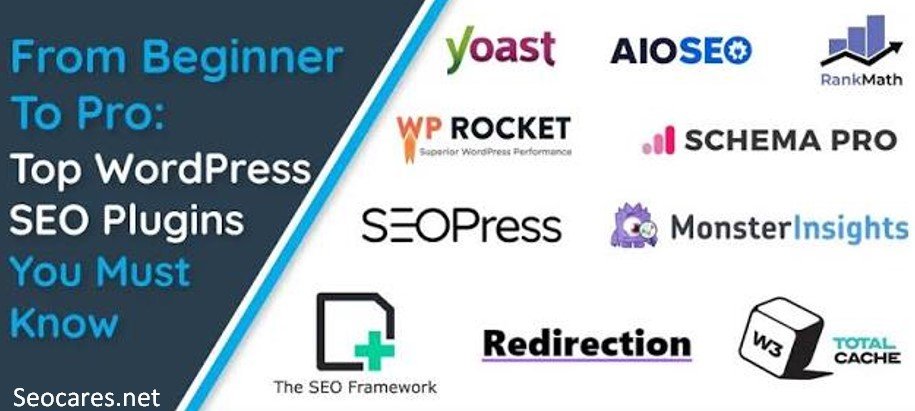
| Plugin | Best For | Free Version | Schema Support | Ease of Use |
| Yoast SEO | Beginners | Yes | Basic | Very Easy |
| Rank Math | Feature-rich control | Yes (generous) | Advanced | Easy |
| All in One SEO | WooCommerce sites | Yes | Advanced | Easy |
| SEOPress | Advanced users | Yes | Advanced | Moderate |
16. Pros & Cons of WordPress for SEO
Pros:
- Highly flexible with SEO plugins and customization
- Strong community support and frequent updates
- Clean, crawlable code structure by default
- Easy integration with analytics and schema tools
Cons:
- Plugin overload can slow sites if not managed carefully
- Requires ongoing maintenance (updates, backups, security)
- Theme quality varies widely, affecting speed and SEO
- Beginners may feel overwhelmed by the number of settings
Frequently Asked Questions
1. Is WordPress good for SEO?
Yes. WordPress offers clean code, flexible plugins, and strong customization options that make it one of the most SEO-friendly platforms available.
2. Which SEO plugin is best for WordPress?
Rank Math and Yoast SEO are both excellent choices. Rank Math offers more free features, while Yoast is known for its simplicity and beginner-friendly interface.
3. How long does WordPress SEO take to show results?
Most sites see meaningful movement within three to six months, though competitive keywords can take longer depending on your niche and site authority.
4. Do I need to use schema markup on every page?
Not every page, but adding it to key content types like articles, FAQs, and products can improve visibility through rich search results.
5.How many plugins should a WordPress site run?
There’s no fixed number, but keeping only essential, well-coded plugins active helps maintain speed and reduces security risks.
6. Does site speed really affect rankings?
Yes. Google has confirmed page speed as a ranking factor, and slow sites also tend to lose visitors before they even see your content.
7. What’s the difference between SEO plugins and hosting for speed?
SEO plugins optimize code and content signals, while hosting quality determines your server response time — both matter for overall performance.
8. Should I focus on new content or updating old posts?
Both matter, but updating existing content with fresh information often delivers faster ranking improvements than publishing something brand new.
9. Is HTTPS really necessary for SEO?
Yes. It’s a confirmed ranking signal, and browsers now flag non-HTTPS sites as insecure, which can drive visitors away.
10. Can I do WordPress SEO without hiring an expert?
Absolutely. With the right plugin, a clear content strategy, and consistent technical maintenance, most site owners can handle solid SEO themselves.
Conclusion
WordPress SEO isn’t about chasing every new trick you read online. It’s about consistently getting the fundamentals right — fast loading pages, clean structure, genuinely helpful content, and steady technical maintenance.
Start with the highest-impact changes first: speed optimization, a reliable SEO plugin, and content that truly answers what your audience is searching for. From there, build momentum with internal linking, schema markup, and regular analytics reviews.
Rankings rarely happen overnight, but sites that apply these WordPress SEO tips consistently tend to see steady, lasting growth — the kind that keeps paying off long after the work is done.